
Kill a stuck PostgreSQL query from your iPhone
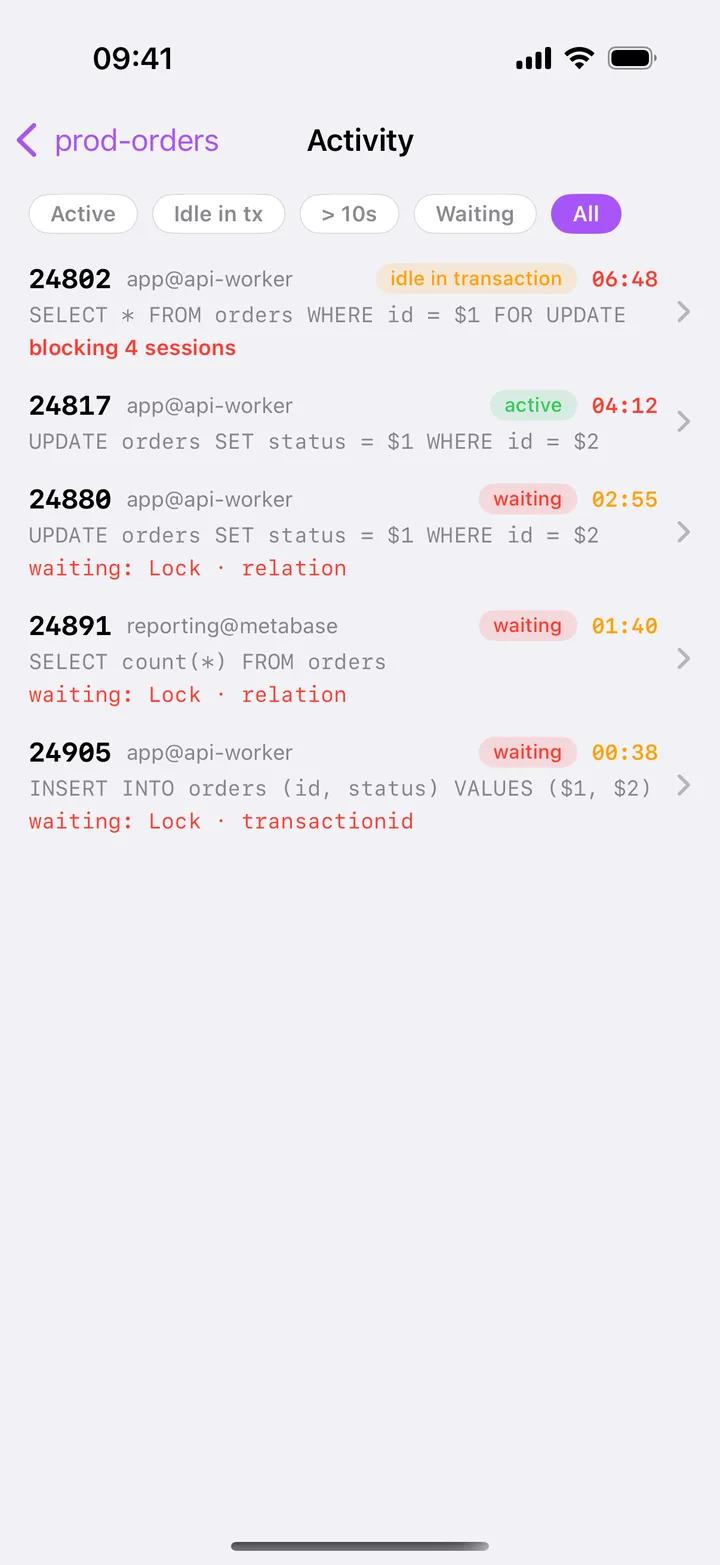
A runaway query is eating the server and you are not at your desk. HeapDeck finds it in Activity, shows what it is running and for how long, and stops it with a confirmation instead of a typed pid.
Cancel or terminate
PostgreSQL has two ways to stop a session’s work, and they are not interchangeable:
SELECT pg_cancel_backend(12345);     -- stop the running query, keep the session
SELECT pg_terminate_backend(12345);  -- end the session, roll back its transaction
Cancel interrupts the statement a session is running. The client gets an error for that statement; the connection and any open transaction stay as they were. It is the gentle option and usually enough for a runaway SELECT or a long UPDATE.
Terminate ends the backend process. Its open transaction rolls back, every lock it held is released, and the application sees its connection drop. Use it when cancel can’t help.
When cancel does nothing
- The session is
idle in transaction. There is no running statement to cancel, but the transaction still holds its locks and keeps vacuum from cleaning up. Only terminate releases it. - The query is in a section that doesn’t check for interrupts, for example deep in an extension’s C code or waiting on a network call. Cancel and terminate are both delivered and take effect when the backend next checks; terminate is the stronger request.
- Your role lacks the right. Without superuser, you can signal sessions of your own role or, as a member of
pg_signal_backend, of other non-superuser roles. PostgreSQL answers with a permission error otherwise.
Don’t reach for kill -9 on the server. PostgreSQL treats a backend killed that way as a crash and restarts every session to recover.
Finding the query to stop
SELECT pid, usename, state,
       now() - query_start AS running_for,
       left(query, 60)     AS query
FROM pg_stat_activity
WHERE state <> 'idle' AND pid <> pg_backend_pid()
ORDER BY running_for DESC NULLS LAST;
On the phone this is the Activity screen: every session, waiting ones first, then by duration. The Longest query tile on Health shows the oldest running statement and turns red at 5 minutes, so you usually tap straight from there. Filters narrow the list to idle in transaction or to sessions older than 10 seconds.
Stopping it from HeapDeck
Swipe the session’s row left for Cancel and Terminate, or open the session and use the buttons there. The confirmation shows the pid, its state, user@app, how long it has been running, the database and the connection, with a PROD badge if you marked the connection as production.
- Cancel sends
pg_cancel_backend(pid). - Terminate sends
pg_terminate_backend(pid)after a red warning that the whole session ends. On a Production connection you type the pid to confirm.
The result comes back in plain words: the statement was asked to stop, the session was terminated, the session had already ended, or PostgreSQL’s own refusal, such as a permission error, word for word.
If the query you want to stop is blocking others, Locks shows the whole chain and how many sessions you free by cancelling its root.
Free and Pro
Seeing every session, its SQL and what it waits for is free. Cancel and terminate are part of HeapDeck Pro, a one-time purchase. HeapDeck’s own session never has these actions.
Stop it from happening again
statement_timeoutcaps how long a single statement may run for a role or a database.idle_in_transaction_session_timeoutends sessions that sit in an open transaction too long.idle_session_timeout(PostgreSQL 14 and later) closes connections that stay idle outside a transaction.