
Postgres on call without carrying the laptop
For SRE, DevOps and platform engineers. Your alerting already wakes you. HeapDeck covers the next ten minutes: see which part of the server is in trouble and stop the bleeding from your phone.
Updated · Vladimir Chemeris, the developer of HeapDeck

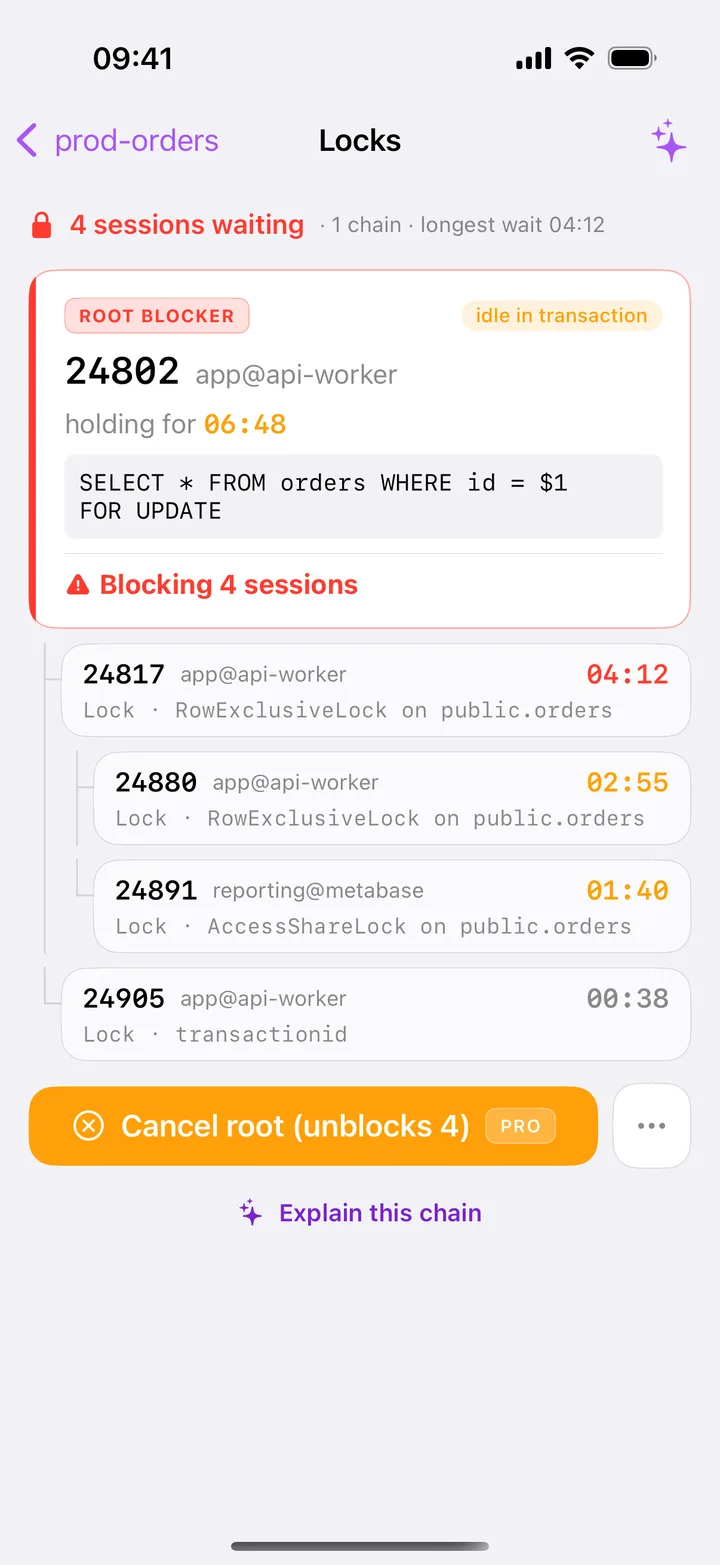
The first ten minutes of a Postgres page
- The alert arrives in PagerDuty, Grafana or Datadog. It names the database, and you’re at dinner.
- Open HeapDeck. Face ID, tap the server, and Health loads. The verdict reads
Healthy,WarningorCritical, and a line under it names the tiles behind it. - Follow the red tile. Blocked opens Locks. Longest query and Sessions open Activity. Wraparound opens Vacuum & Bloat. Replication opens the slots and standbys.
- Act, if acting helps. Cancel or terminate the root blocker and read the measured result, such as
Terminated · 2 sessions unblocked · 2 still waiting. Drop a dead slot. RunVACUUM (ANALYZE)on one table. - Hand over. Copy the full SQL and the pid from the session’s details into the incident channel, for whoever fixes the cause.
Do it from the phone, or leave it for the desk
| From the phone | At your desk |
|---|---|
| Kill a runaway query | Find the plan or index behind it |
End idle in transaction sessions |
Fix the code path that left them open |
| Clear a lock chain | Rerun the migration with lock_timeout |
| Drop a slot whose consumer is gone | Rebuild the replica or CDC connector |
Run VACUUM (ANALYZE) on a table |
Tune autovacuum, plan a VACUUM FULL |
| Read replication lag by WAL phase | Fail over, restore, change server config |
HeapDeck doesn’t read server logs and doesn’t show CPU or free disk. Your provider’s dashboard or an SSH session covers those.
Set it up before the next page
A role for on-call. Run this once as a superuser. pg_monitor opens the monitoring views, and pg_signal_backend lets the role stop other non-superuser roles’ sessions:
CREATE ROLE oncall LOGIN PASSWORD '…';
GRANT pg_monitor, pg_signal_backend TO oncall;
Managed services differ in who may grant these roles, so check yours.
An SSH key for one job. Create a key for HeapDeck alone, or a Secure Enclave key in the app, and limit it on the bastion to the one forward it needs. The SSH tunnel guide has the authorized_keys line.
Mark production. Turn on Production for the connection to get the PROD badge and typed confirmations. Check the Read-only switch at the same time: Read-only for Production turns it on for you by default, and a read-only connection refuses cancel and terminate as well as writes.
Test from outside the office. Connect once over cellular, away from your usual network, and run Test connection. It walks the path and reports where it stopped.
Practice in the demo. Explore demo data runs a fictional incident with the whole flow unlocked, and nothing goes to a database. Buy Pro before your next page, so your first cancel doesn’t stop at a paywall.
What your security team will ask
- Where do credentials live? In the iOS Keychain on that iPhone, marked
WhenUnlockedThisDeviceOnly: no iCloud sync, no transfer to another device. Face ID locks the app by default. - Does database traffic pass through a vendor? No. The app connects from the phone to your server, or through your bastion. No HeapDeck server sits in that path, and there is no account.
- What leaves the phone besides that? Crash reports to Sentry and usage counters to our own Aptabase, each behind a switch and only after a consent screen, and never query text, host names, table names or values. The privacy policy has the list.
- How is the connection protected? TLS with
sslmode=requireby default and a pinned SHA-256 fingerprint, orverify-full. HeapDeck pins SSH host keys too, and a changed key blocks the connection. It doesn’t support mTLS or Kerberos. - Can it write by accident? Free never writes. On Pro, each write passes the Read-only switch, a SQL classifier and your confirmation, and destructive steps ask you to type the target’s name.
- What about the AI assistant? It is optional and part of Pro. It runs only with your API key or your own Ollama and sends a redacted snapshot when you ask, with no host, password, or row values.
Cost
Monitoring one server is free, so you can check HeapDeck against your own production before anyone pays. Pro is one purchase of $19.99 per Apple ID, with no subscription, for unlimited servers and the actions.
Questions
Can you handle a Postgres incident from a phone?
You can stop the common ones: kill a runaway query, end an idle transaction, clear a lock chain, drop a dead replication slot. Fixing the cause, such as a missing index or a bad deploy, still takes your laptop.
Does HeapDeck replace PagerDuty, Grafana or Datadog?
No. HeapDeck has no alerts, no background monitoring and no metric history. Those tools tell you something is wrong; you open HeapDeck to find out what and to act on it.
Is it safe to keep production credentials on a phone?
Passwords and keys stay in the iOS Keychain on that iPhone, with no sync, and Face ID locks the app. Use a dedicated role and an SSH key limited to one forward. If you lose the phone, remove that key from the bastion and rotate the role's password.
Does each engineer need to buy Pro?
Yes. Pro is a one-time purchase tied to an Apple ID, and Family Sharing is off. Each engineer can check the app on the Free tier first, which covers monitoring one server.
PagerDuty, Grafana and Datadog are trademarks of their respective owners. HeapDeck is not affiliated with or endorsed by any of them.