
PostgreSQL monitor for iPhone
HeapDeck turns your iPhone into the on-call screen for a PostgreSQL server: one verdict, ten health tiles, and a screen behind each tile for the moment one of them turns red.
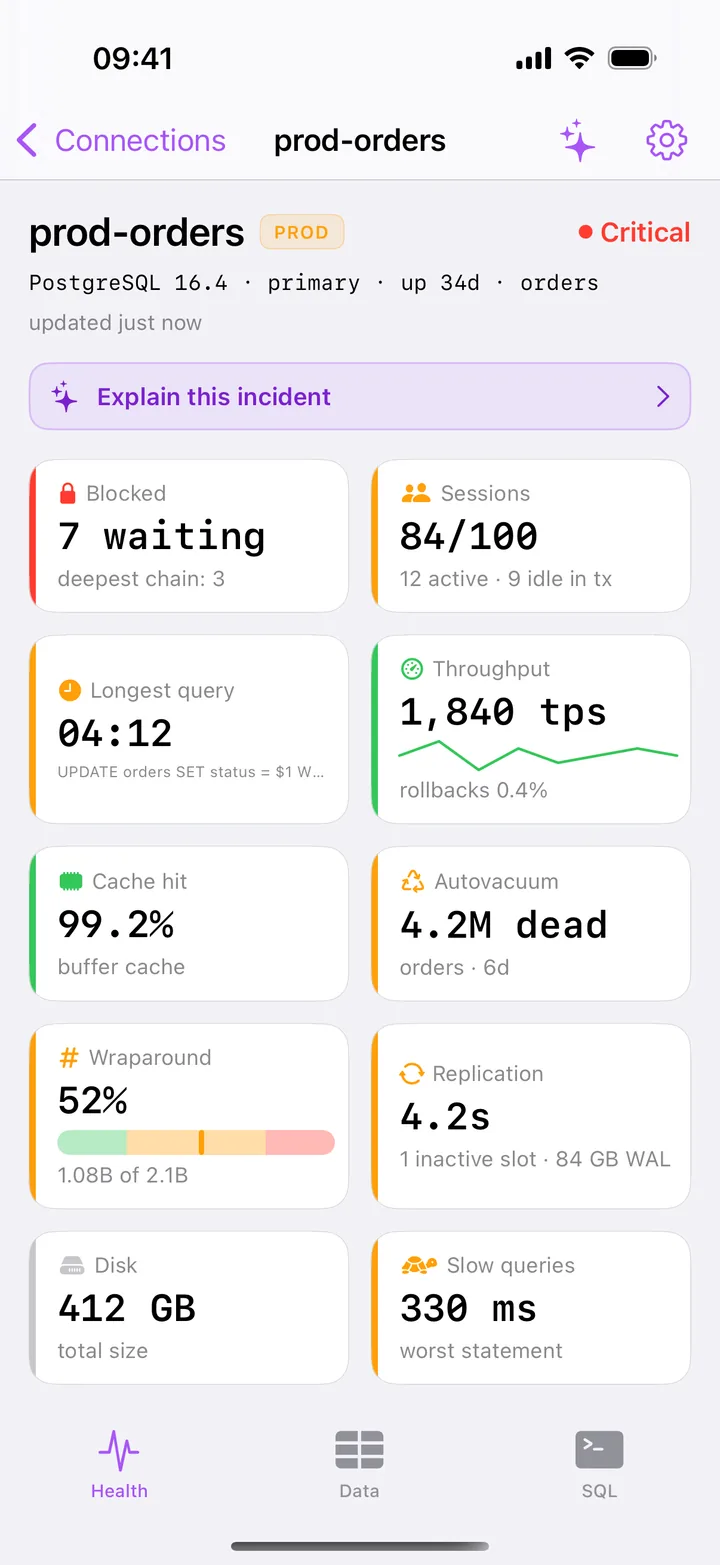
One screen answers: is this server in trouble, and where?
You open a connection and land on Health, not on a list of tables. At the top sits one verdict for the whole server, Healthy, Warning, Critical or Limited, and under it ten tiles. Each tile has a status strip, and the verdict equals the worst tile, so the reason for a red header is never more than a glance away.
| Tile | What it shows | Turns red at |
|---|---|---|
| Blocked | sessions waiting on a lock, and the deepest chain | 3 waiting, or a chain of 3 |
| Sessions | client sessions against max_connections, and how many are idle in transaction |
90% of max_connections |
| Longest query | age of the oldest running statement, with its SQL | 5 minutes |
| Cache hit | share of reads served from shared buffers | below 80% |
| Autovacuum | the table with the most dead rows and when it was last vacuumed | 1M dead rows and no vacuum for 7 days |
| Wraparound | the oldest datfrozenxid as a share of 2³¹ |
75% |
| Replication | worst replay lag, or an inactive slot with its WAL | 5 minutes of lag |
| Slow queries | the worst mean time from pg_stat_statements |
1000 ms |
Throughput and disk size are shown without a verdict: TPS has no universal threshold, and PostgreSQL doesn’t report how big the volume is. Health refreshes every 10 seconds while it is on screen. When a refresh fails, the last values stay with a banner that tells you how old they are.
A screen behind every tile
Tap a tile and you are on the screen that explains it:
- Locks: the blocking tree from
pg_blocking_pids(), with the root blocker on top and how many sessions cancelling it would free. More on finding blocking queries. - Activity: every session from
pg_stat_activity, waiting ones first, with filters foridle in transactionand long runners. See pg_stat_activity on iPhone. - Vacuum & Bloat: wraparound with the oldest tables by
relfrozenxid, dead tuples per table, unused indexes. See autovacuum and wraparound. - Replication: replay lag per standby broken down by WAL phase, and slots with the WAL they retain. See replication lag and slots.
- Storage: database, table and index sizes.
- Slow queries: the 300 heaviest statements from
pg_stat_statements, and which sessions are running one right now.
Activity and Locks refresh every 5 seconds while open. The other screens read the server when you open them.
How it connects
HeapDeck speaks the PostgreSQL protocol from your iPhone straight to your server, or through an SSH tunnel to your bastion. It supports PostgreSQL 13–18, primaries and standbys, with SCRAM-SHA-256 or md5 authentication.
New connections use sslmode=require. HeapDeck shows the certificate’s SHA-256 fingerprint the first time, remembers it, and stops to ask if it ever changes. That also works for managed providers whose certificate roots iOS doesn’t ship.
There is no HeapDeck server in the path and no account. Passwords, SSH keys and pinned fingerprints stay in the iOS Keychain on the phone, and Face ID locks the app.
No superuser needed
A role with pg_monitor sees everything the monitoring screens show:
GRANT pg_monitor TO monitoring_role;Without it, HeapDeck still connects and marks what the server hides from your role, such as other users’ SQL, instead of showing an empty screen that looks like good news. The GRANT is one tap away on every screen that needs it.
What is free
Every monitoring screen is free, on as many servers as you add, along with the data browser and read-only SQL. HeapDeck Pro is one purchase of $29.99 for the actions: cancel and terminate, VACUUM and ANALYZE, dropping a replication slot, writes in the console and the AI assistant. There is no subscription.
What it doesn’t do
HeapDeck works while it is open. It doesn’t monitor in the background or send push alerts, so keep your alerting in Grafana, Datadog or PagerDuty and open HeapDeck when they page you. It is built for iPhone in portrait; on iPad it runs in compatibility mode.