
Fix “sorry, too many clients already” in Postgres
Your application can't connect and the logs fill with FATAL errors. PostgreSQL has run out of connection slots. Check whether idle sessions hold them.
Updated · Vladimir Chemeris, the developer of HeapDeck

Read the error first
PostgreSQL has several connection limits, and all of them report SQLSTATE 53300. The text tells you which one you hit.
| Error | Limit you hit |
|---|---|
sorry, too many clients already |
max_connections: even the reserved slots are gone |
remaining connection slots are reserved for roles with the SUPERUSER attribute (PostgreSQL 16+) |
Only superuser_reserved_connections are left, 3 by default |
remaining connection slots are reserved for non-replication superuser connections (PostgreSQL 13–15) |
The same limit, older wording |
remaining connection slots are reserved for roles with privileges of the "pg_use_reserved_connections" role (PostgreSQL 16+) |
reserved_connections |
too many connections for role "app" |
The role’s CONNECTION LIMIT |
too many connections for database "app" |
The database’s CONNECTION LIMIT |
A role limit or a database limit leaves the rest of the server working, so you can fix those with ALTER ROLE or ALTER DATABASE from any session that still has a slot.
See who holds the slots
SELECT state, usename, application_name, client_addr,
       count(*)                  AS sessions,
       max(now() - state_change) AS longest
FROM pg_stat_activity
WHERE backend_type = 'client backend'
GROUP BY 1, 2, 3, 4
ORDER BY sessions DESC;
Read the result by state:
- Many
idlefrom one application: its pool is too large for the server, or the application leaks connections. - Many
idle in transaction: the application opens transactions and waits on something else. They hold locks too: what idle in transaction means. - Many
active: the sessions wait on a lock or on slow queries. Check blocking queries before you touch connection settings, because a lock pile-up looks like a connection problem.
Free slots now
If you can’t get a session at all, connect as a superuser, since superuser_reserved_connections keeps slots for that role. Without one, restart or scale down one application instance and use the slots its pool releases.
Then end the sessions you can spare:
SELECT pg_terminate_backend(pid)
FROM pg_stat_activity
WHERE state = 'idle'
  AND application_name = 'api'
  AND state_change < now() - interval '10 minutes';
Change the filter to state = 'idle in transaction' for abandoned transactions. Terminating rolls back any open transaction, and the client sees a dropped connection, which a well-behaved pool replaces. Without superuser, you can signal your own role’s sessions, or other non-superuser roles’ sessions as a member of pg_signal_backend.
Before you raise max_connections
Raising the limit takes a restart and each session is a server process, so it buys time at a memory cost. Do the arithmetic first: application instances × pool size per instance has to stay below max_connections minus the reserved slots.
A connection pooler fixes the usual cause. PgBouncer in transaction mode lets thousands of client connections share a small number of server sessions. Managed services offer their own: Neon’s -pooler host, Supabase’s pooler, RDS Proxy on AWS.
Keep it from coming back
- Set
idle_in_transaction_session_timeoutfor application roles, so abandoned transactions end by themselves. - Set
idle_session_timeout(PostgreSQL 14 and later) for roles that skip the pooler. - Cap reporting and batch roles:
ALTER ROLE reporting CONNECTION LIMIT 20;. - Alert at 70 to 80% of
max_connections. At 100% your monitoring may fail to connect as well.
On the phone
HeapDeck’s Sessions tile on Health reads 84/100 with 12 active · 9 idle in tx under it. It turns amber at 70% of max_connections or at 5 sessions idle in transaction, and red at 90%. The count includes HeapDeck’s own session.
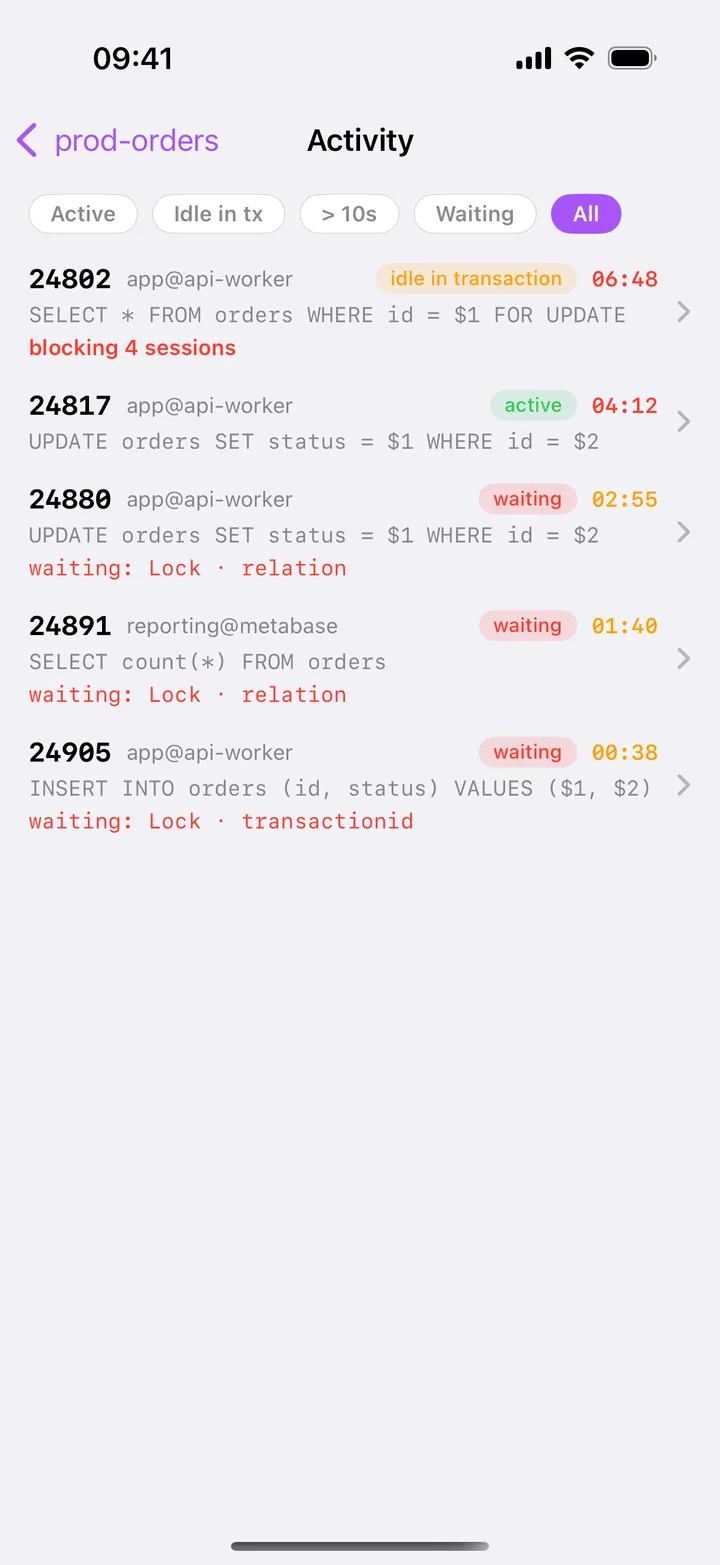
Tap the tile to open Activity, filter by Idle in tx or > 10s, and read who holds each session: pid, user@application, state and duration. Swipe a row to terminate it, which is part of HeapDeck Pro. On a connection you marked as Production, you type the pid first.
With no slot left for your role, HeapDeck reports The server is out of connection slots. and All max_connections slots are in use. Free some sessions, then retry. That message means the server is up, so skip the VPN check and free sessions.
Questions
What is the default max_connections in Postgres?
100 in most installs, or less if the kernel settings can't support it when initdb runs. Managed services set their own value. Run SHOW max_connections; to see yours.
Does changing max_connections need a restart?
Yes. PostgreSQL reads max_connections at server start and sizes shared memory from it. On a standby the value must be at least as high as on the primary.
Should I raise max_connections?
Raise it when real concurrent work needs the slots. Each connection is a server process, and more of them cost memory and contention. If most sessions sit idle, a pooler solves the problem at lower cost.
Can HeapDeck connect when Postgres has no slots left?
Only with a role that may use a reserved slot, such as a superuser. Otherwise it reports The server is out of connection slots. and tells you the server is up. HeapDeck takes a slot like any client, so open it at the amber tile, before the limit.
Amazon Web Services, AWS, Amazon RDS and RDS Proxy are trademarks of Amazon.com, Inc. or its affiliates. PgBouncer, Neon and Supabase are the property of their respective owners. HeapDeck is not affiliated with or endorsed by any of them.