
Replication lag and replication slots on your iPhone
HeapDeck shows how far each standby is behind, which phase of WAL shipping the lag sits in, and every slot with the WAL it keeps on disk, including the inactive one nobody remembers creating.
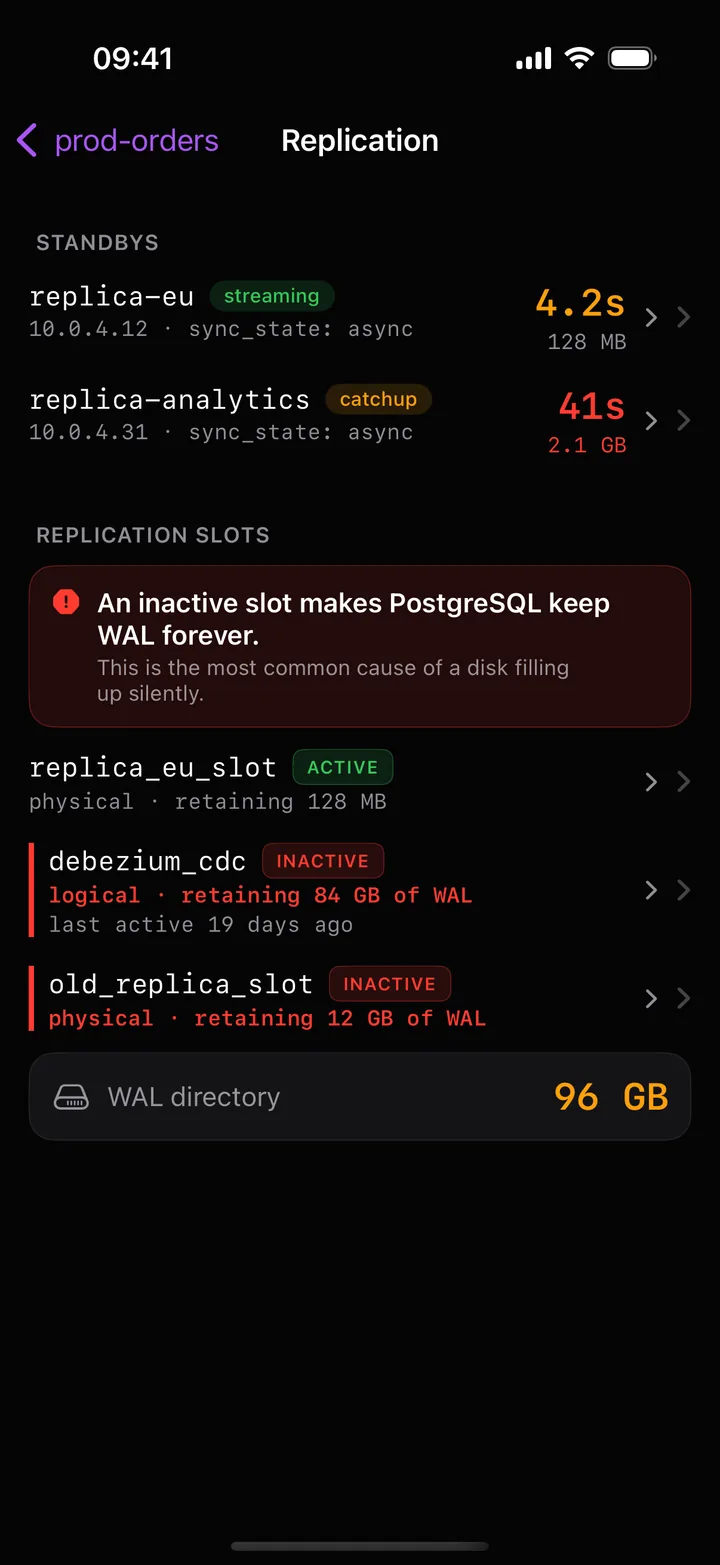
Lag, broken down by phase
On a primary, Replication lists the standbys from pg_stat_replication, the most lagging first: application_name, streaming or catchup, the client address, sync state, replay lag and, when the server reports it, the lag in bytes. Lag turns amber at 1 second and red at 30.
Open a standby and HeapDeck lays out the WAL positions, Sent LSN, Written LSN, Flushed LSN and Replayed LSN, together with write, flush and replay lag. A section called What the lag means reads them for you:
- Replication is catching up before replay: WAL is slow to reach the standby or to be written there, so look at the network and the standby’s disk.
- WAL has arrived but replay is behind: the standby has the data and is slow to apply it, often because of a long query on the standby or I/O.
- No measured replication gap, or Lag cause is unknown when the server hides some of the phases from your role.
Connected to a standby, the same screen shows its own recovery position: last WAL received, last WAL replayed, replay lag and how much is received but not yet replayed.
The slot that fills your disk
A replication slot makes the primary keep every WAL segment its consumer has not confirmed. That is what you want while the consumer is alive. When the consumer is gone, a decommissioned replica or a CDC connector that was switched off, the slot keeps WAL forever and the disk fills up without a single error until it is full.
You can see retained WAL per slot with:
SELECT slot_name, slot_type, active, wal_status,
       pg_size_pretty(pg_wal_lsn_diff(pg_current_wal_lsn(), restart_lsn)) AS retained_wal
FROM pg_replication_slots
ORDER BY pg_wal_lsn_diff(pg_current_wal_lsn(), restart_lsn) DESC NULLS LAST;
HeapDeck lists slots inactive first, then by retained WAL, each with physical or logical, retaining 84 GB of WAL, and on PostgreSQL 17 and later how long ago it was last active. When any slot is inactive, a red banner says so: An inactive slot makes PostgreSQL keep WAL forever. This is the most common cause of a disk filling up silently. The Replication tile on Health turns amber for any inactive slot, so you see it before the disk alert.
Slot details add wal_status (reserved, extended, unreserved or lost), safe WAL remaining, the active pid, restart and confirmed flush LSN, and for logical slots the plugin and database.
Dropping a slot
If the consumer is not coming back, drop the slot. In HeapDeck you swipe the slot or tap Drop slot in its details. The sheet shows how much WAL it holds and warns that a replica depending on it would have to be rebuilt; the button stays disabled until you type the slot name. HeapDeck then runs pg_drop_replication_slot() and checks pg_replication_slots to confirm the slot is gone. PostgreSQL refuses to drop a slot that is in use, and HeapDeck shows its refusal as it is.
Dropping slots is part of HeapDeck Pro. Watching lag and slots is free.
For a deeper look at slots, max_slot_wal_keep_size and how to decide whether a slot is safe to drop, read an inactive replication slot is filling your disk.