
Postgres apps for iPhone compared
The App Store has many Postgres apps, and they split into two kinds: SQL clients built around tables and queries, and monitors built around server state. This comparison comes from each app's own listing.
Updated · Vladimir Chemeris, the developer of HeapDeck

The apps, from their listings
We read each US App Store listing on November 1, 2026, and we did not install the other apps. Listings can leave features out, so check the app itself before you decide. Tell us at support@heapdeck.app if a line here is wrong.
| App | Kind | Price, per its listing | Requires | The listing names |
|---|---|---|---|---|
| HeapDeck | Monitor, with actions | Free; Pro $19.99 one-time | iOS 17 | Health verdict, lock tree, wraparound, replication slots, slow queries, cancel and terminate, SSH tunnel, Secure Enclave keys |
| psq | Monitor | Free | iOS 26 | Live dashboard, active queries, cancel and terminate, replication streams, TPS, TLS |
| DB Compass (“PostgreSQL Client”) | SQL client | Free; in-app lifetime unlock | iOS 16.4 | Data grid, query scripts with AI, sessions manager, server status graphs, TLS, SSH tunnel, Secure Enclave and U2F keys |
| PG Orbit | SQL client | Free; Premium $9.99 one-time | iOS 15 | Schema explorer, SQL editor, in-place editing, client certificates, SSH tunnel, cloud discovery, account sync, Mac app |
| SQLPro for Postgres | SQL client | Free; Premium lifetime or subscription | iOS 17 | Autocomplete, multiple queries at once, SSH tunnel with a password |
| TablePlus | SQL client, many databases | Free download | iOS 15 | MySQL, PostgreSQL and other drivers, row and structure editing, filters, export, SSH tunnel, TLS |
| Navicat for PostgreSQL | Admin tool | Paid download | iOS 13 | Data editing, Navicat Cloud sync, SSH and SSL tunnels |
Two kinds of app
A SQL client centers on tables: you read, filter and edit rows, write queries and change schema. On a bad night it can still do the job, as long as you type the right catalog queries.
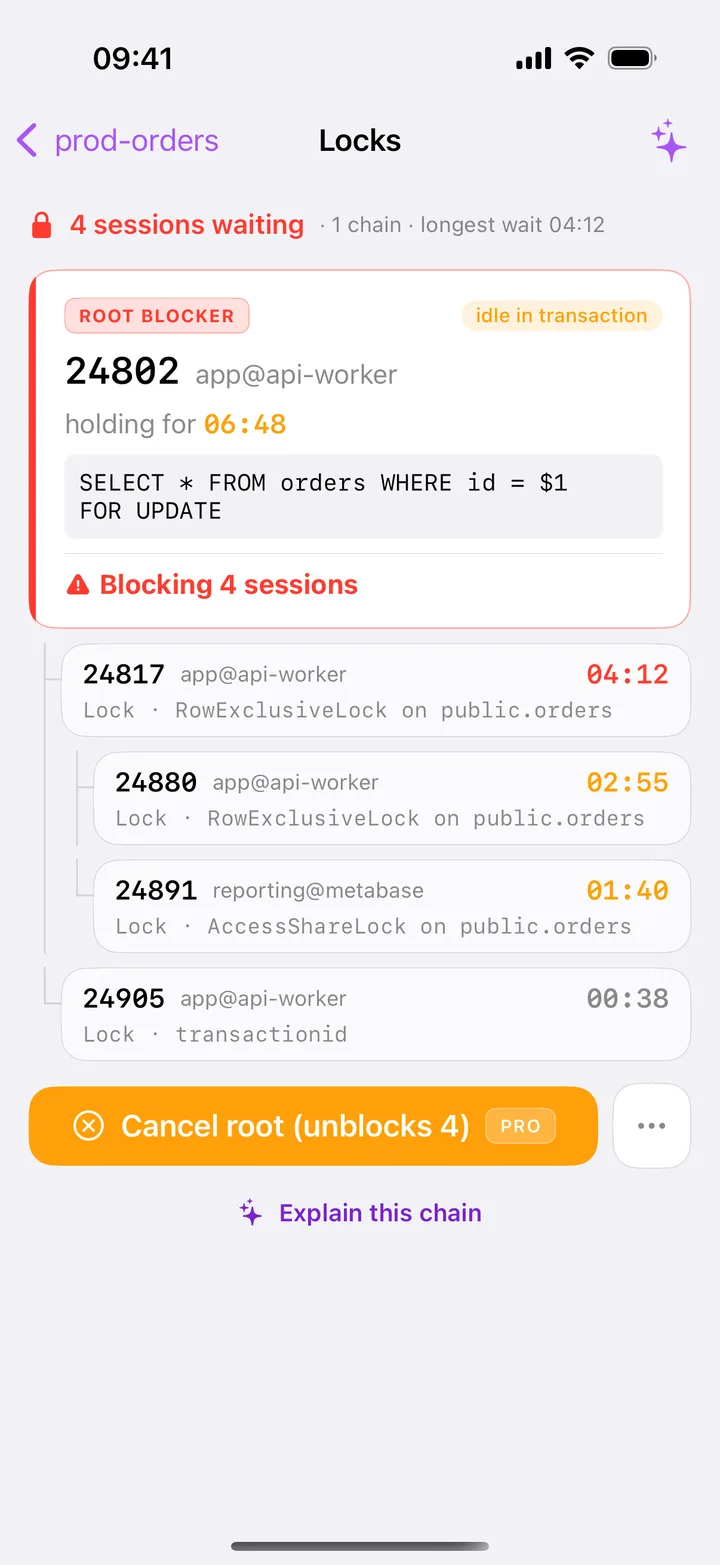
A monitor opens on the server’s state. It reads pg_stat_activity, pg_locks and the other statistics views and lays them out for you. HeapDeck opens on Health, with one verdict and ten tiles, and the list of tables sits one tab away.
What HeapDeck adds as a monitor
These are the parts we built for incidents. Of the listings above, only HeapDeck’s names them:
- The lock tree.
pg_blocking_pids()drawn as a tree with the root on top, and a button that says how many sessions it frees. See blocking queries. - Wraparound and autovacuum. The share of 2³¹, the oldest tables, the common causes, dead tuples and unused indexes. See wraparound.
- Replication slots. The WAL each slot retains, with a warning for an inactive slot. See lag and slots.
- Permission labels. A role without
pg_monitorgets labels and theGRANTthat fixes it. - Checks before writes. A SQL classifier on each statement, on Free as well, and a typed name for destructive steps.
When another app fits better
- You mostly edit data. A SQL client gives you more here. HeapDeck edits one row at a time, on tables with a primary key.
- You use more than PostgreSQL. TablePlus covers several database engines from one app. HeapDeck covers PostgreSQL only.
- You need client certificates. PG Orbit’s listing names them. HeapDeck doesn’t support mTLS.
- You want connections to sync between devices, or a Mac app. PG Orbit’s listing names both. HeapDeck keeps connections on the device and has no Mac version.
- You use hardware SSH keys. DB Compass’s listing names U2F and FIDO NFC keys. HeapDeck supports Secure Enclave keys, with no hardware
sk-*keys. - You want a live dashboard with nothing else. psq is free and refreshes every 2 seconds, on iOS 26.
Is there a pgAdmin for iPhone?
No. The pgAdmin project publishes builds for desktop systems and servers, and you can open a self-hosted pgAdmin in a phone’s browser. We found no pgAdmin listing in the US App Store. The monitoring tools comparison covers pgAdmin, psql over SSH and the rest in more detail.
Questions
Is there a pgAdmin app for iPhone?
No. The pgAdmin project publishes container, macOS, Python, APT, RPM, source and Windows builds, and we found no pgAdmin listing in the US App Store. For server state on an iPhone, try HeapDeck. For tables and queries, try a SQL client from the table on this page.
What is the best Postgres client for iPhone?
It depends on what you do most. If you browse and edit data, pick a SQL client: PG Orbit, DB Compass, SQLPro and TablePlus all do this. If you get paged about the server, pick a monitor. HeapDeck includes a table browser and a console, so it can cover both for light data work.
Can I run psql on an iPhone?
Through an SSH app you can run psql on a server you connect to. A native app like HeapDeck speaks the PostgreSQL protocol from the phone and gives you screens in place of a terminal.
Which iPhone app can kill a Postgres query?
HeapDeck and psq name cancel and terminate in their listings, and DB Compass lists a sessions manager. From any client with a SQL editor, you can also run SELECT pg_terminate_backend(pid); by hand. See how to kill a stuck query.
DB Compass, TablePlus, SQLPro, Navicat, PG Orbit, psq and pgAdmin are trademarks or names of their respective owners. HeapDeck is not affiliated with or endorsed by any of them.