
Transaction ID wraparound and autovacuum, on your iPhone
Wraparound is the PostgreSQL outage that gives weeks of warning, if anyone is looking. HeapDeck shows how close each server is, which tables hold it back and what usually stops autovacuum from catching up.
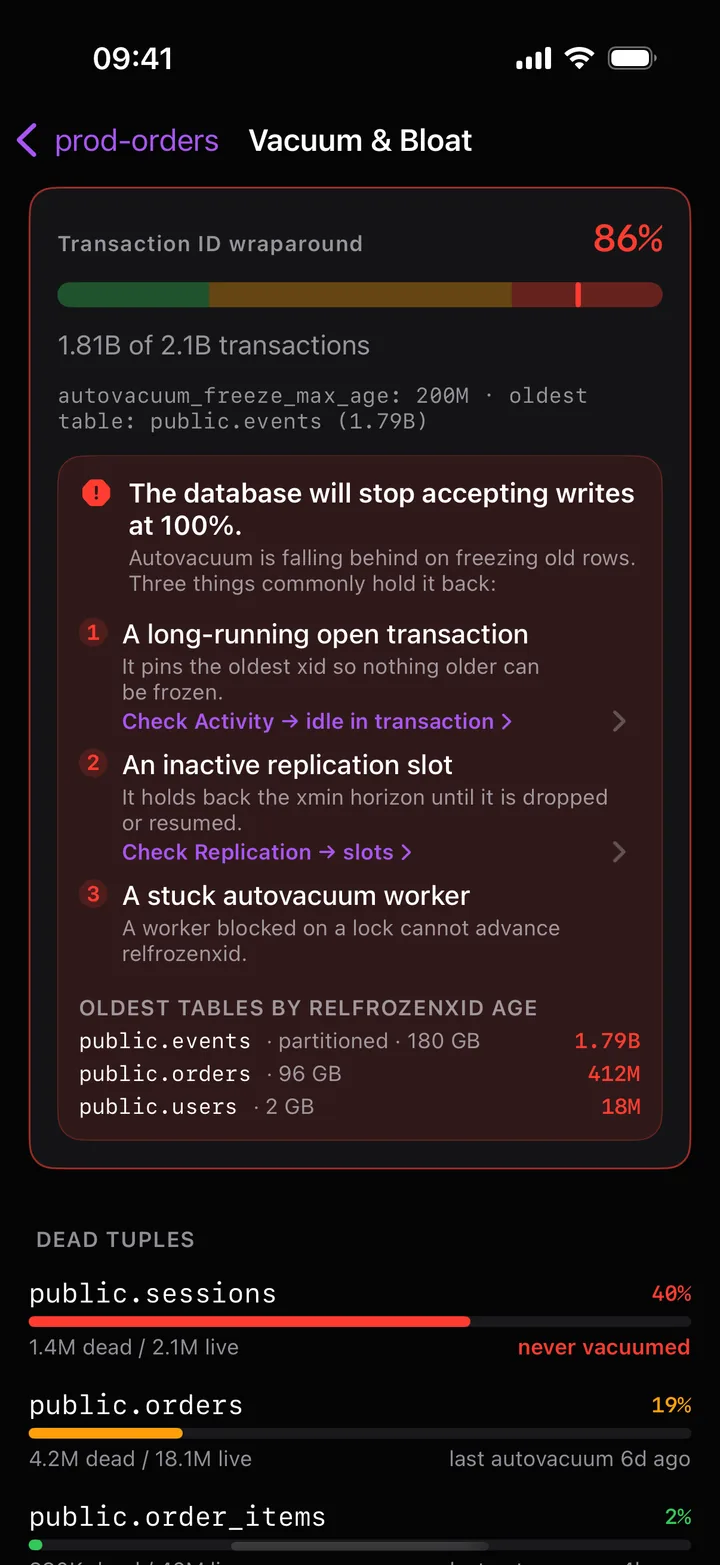
Why wraparound is worth a tile
PostgreSQL transaction IDs are 32-bit. Rows carry the ID of the transaction that wrote them, and vacuum has to freeze old rows before the counter comes around again, about 2.1 billion transactions later. A database’s datfrozenxid is the oldest unfrozen ID it still holds. If its age gets too close to the limit, PostgreSQL stops accepting commands that assign new transaction IDs: the database turns read-only until a vacuum finishes, and on a big table that vacuum can take hours.
Autovacuum normally prevents this on its own: once a table’s age passes autovacuum_freeze_max_age (200 million by default), it starts an aggressive vacuum. Trouble starts when something stops that vacuum from advancing the horizon.
You can check the age yourself:
SELECT datname,
       age(datfrozenxid) AS xid_age,
       round(100.0 * age(datfrozenxid) / 2147483648, 1) AS pct_of_limit
FROM pg_database
ORDER BY xid_age DESC;
What HeapDeck shows
The Wraparound tile on Health shows the worst database as a share of 2³¹, like 52% with 1.08B of 2.1B. It turns amber at 25% and red at 75%.
Tap it and Vacuum & Bloat opens with the same number, autovacuum_freeze_max_age and the oldest table. From 75% the screen says it outright, The database will stop accepting writes at 100%, and lists the three usual reasons autovacuum can’t freeze old rows:
- A long-running open transaction. Its snapshot pins the oldest visible ID. The link goes to Activity filtered to
idle in transaction. - An inactive replication slot. It holds back the horizon until it is dropped or its consumer comes back. The link goes to Replication › slots.
- A stuck autovacuum worker, for example one blocked on a lock it can’t get.
Under that is the list of the oldest tables by relfrozenxid age in the current database.
Dead tuples and unused indexes
The same screen lists tables by dead tuples: the dead share of each table, 18.1M dead / 42M live, and when it was last vacuumed, or never vacuumed in red. Swipe a row to run VACUUM (ANALYZE) or ANALYZE on that table. The operation runs on its own short connection while monitoring continues, and you can stop it from the screen.
VACUUM FULL is on the same sheet, behind a warning that it takes an ACCESS EXCLUSIVE lock for the whole rewrite and a field where you type the table name.
Unused indexes lists indexes with no scans since statistics were last reset, largest first, with the space they hold. HeapDeck doesn’t drop indexes: the button copies DROP INDEX CONCURRENTLY schema.index; for you to run when you can watch it. Zero scans alone doesn’t prove an index is useless, and the screen says so.
Free and Pro
Everything on this page you can see is free. Running VACUUM and ANALYZE from the phone is part of HeapDeck Pro, a one-time purchase.