
What you can fix in Postgres from your iPhone
Eleven incidents an on-call engineer meets. For each one: what you see first, the HeapDeck screen to open and the action you take.
Updated · Vladimir Chemeris, the developer of HeapDeck

| What you see | Where to look | What you can do |
|---|---|---|
| API timeouts, connections climbing | Blocked tile, then Locks | Cancel or terminate the root blocker |
| A query running for minutes | Longest query tile, then Activity | Cancel the query or terminate the session |
A session left idle in transaction |
Sessions tile, then Activity | Terminate it |
sorry, too many clients already |
Sessions tile, then Activity | Terminate idle sessions |
| “The database is slow” | Health, then Slow queries | Find the statement, copy its SQL |
| A migration hangs and a table stops answering | Locks | Stop the migration or the old transaction |
| The disk keeps growing | Replication tile, then Replication | Drop the inactive slot |
| A standby falls behind | Replication | Read which WAL phase holds it up |
| A wraparound warning | Wraparound tile, then Vacuum & Bloat | Run VACUUM on the oldest tables |
Who is blocking everyone?
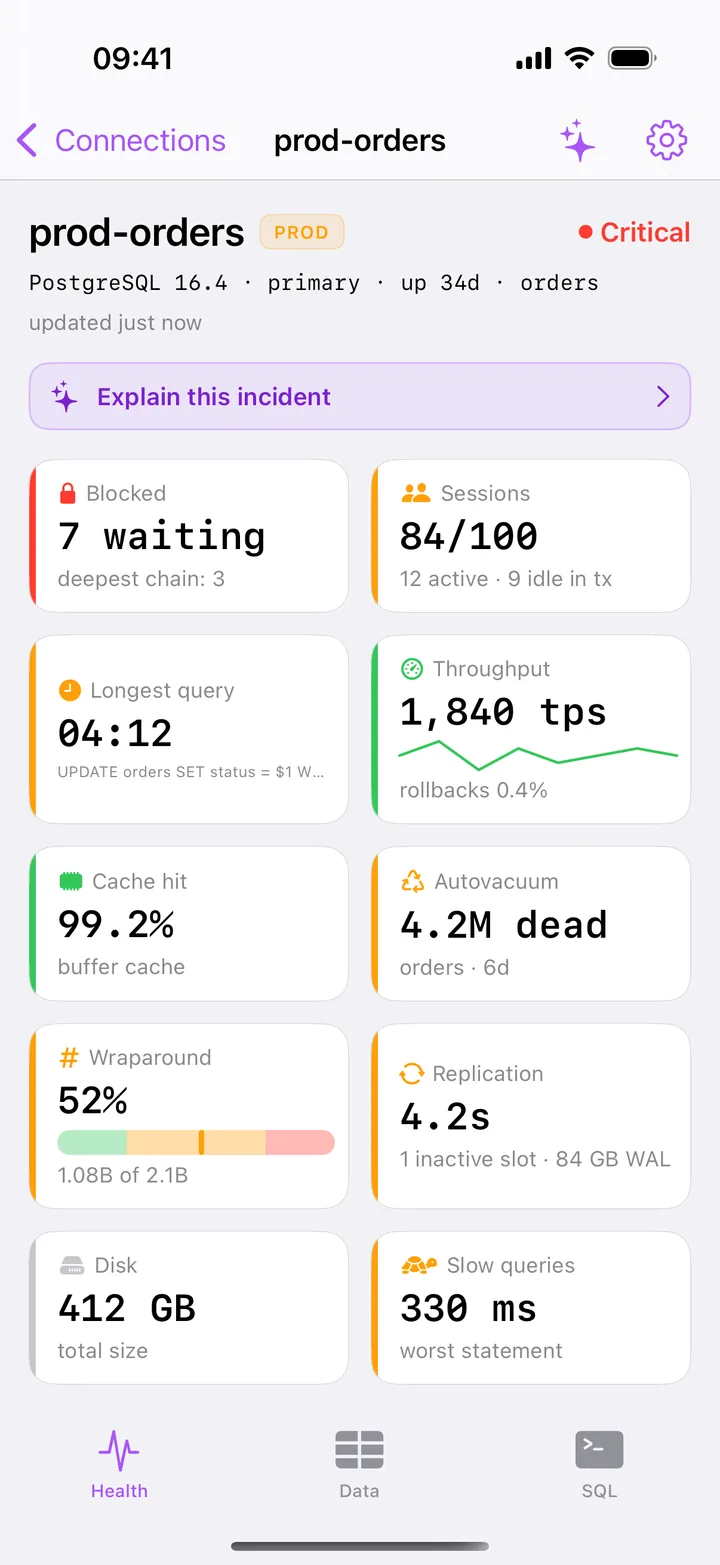
Requests pile up, the API times out and connections climb. The Blocked tile on Health turns red at 3 waiting sessions or a chain of 3. Locks draws the tree from pg_blocking_pids() with the root blocker on top, and its button counts the sessions you free: Cancel root (unblocks 2) or Terminate root (unblocks 2). HeapDeck reads the chain again before it sends the signal. Read more about finding blocking queries.
How do I kill a stuck query?
The Longest query tile turns amber at 1 minute and red at 5. Activity lists waiting sessions first, then the rest by duration. Swipe a row for Cancel, which sends pg_cancel_backend, or Terminate, which sends pg_terminate_backend. See cancel, terminate and the cases where cancel does nothing.
What does idle in transaction hold up?
A session that opened a transaction and went quiet keeps its locks until it commits, rolls back or disconnects. The Sessions tile turns amber at 5 such sessions, and the Idle in tx filter in Activity lists them with the age of each transaction. Cancel has nothing to stop here, so HeapDeck offers Terminate only. More in what idle in transaction means.
What do I do about too many clients already?
Sessions shows client sessions against max_connections, amber at 70% and red at 90%, so you can act before the server refuses logins. HeapDeck needs a free slot like any client: with none left, it reports The server is out of connection slots. See how to free connections.
Why is the database slow?
Health gives you one verdict and names the tiles behind it. Check blocked sessions, the longest query, connections and cache hit there. Slow queries then ranks the 300 heaviest statements from pg_stat_statements by total time, mean, calls or rows. On PostgreSQL 14 and later, a statement’s detail lists the sessions running it now. Follow the five checks in order.
Why did a migration stop every query on a table?
An ALTER TABLE waiting for ACCESS EXCLUSIVE queues each later query on that table behind it. Locks shows the old transaction at the root, the ALTER under it and the readers under the ALTER, so you can stop whichever costs less to redo. Read the lock queue, step by step.
Why does the disk keep growing?
An inactive replication slot keeps WAL on disk until the disk is full. The Replication tile turns amber for any inactive slot and names the WAL it holds, such as 1 inactive slot · 84 GB WAL. The Replication screen lists inactive slots first, and you can drop one after you type its name. Read about the slot that fills your disk.
How far behind is the replica?
Replication lists standbys with the most lagging first. Open one for its WAL positions and write, flush and replay lag. Under What the lag means, you read whether the delay sits before the standby’s disk or in replay. See replication lag and slots.
How close is transaction ID wraparound?
The Wraparound tile shows the oldest datfrozenxid as a share of 2³¹, amber at 25% and red at 75%. Vacuum & Bloat names the oldest tables and the common reasons autovacuum can’t freeze them, lists dead tuples per table and runs VACUUM (ANALYZE) on the table you pick. See wraparound and autovacuum.
Can I see all of this without superuser?
Yes. A role with pg_monitor sees everything the monitoring screens show. Without it, HeapDeck still connects, marks what PostgreSQL hides from your role and shows the GRANT that fixes it. To stop sessions of other roles you need membership in pg_signal_backend or the rights of that role. If you have no DBA, start with Postgres monitoring without a DBA.
Can I reach a database behind a bastion?
Yes. HeapDeck opens an SSH tunnel from your iPhone through up to three hosts, with Ed25519, ECDSA or RSA keys, a Secure Enclave key, or a password. Host keys and the TLS certificate stay pinned, and no server of ours sits in the path. Set it up with the SSH tunnel guide.
Who it’s for
- On-call SRE and DevOps engineers, who get paged away from a laptop.
- Backend developers without a DBA, on Supabase, Neon, Amazon RDS or their own servers.
- Solo founders with nobody else on call.
Where HeapDeck stops
- It doesn’t wake you. It has no push alerts and no background monitoring, and it keeps no history of metrics. Pair it with an alerting tool: how the tools compare.
- It shows what PostgreSQL reports. You get database sizes, with no free disk space or CPU, since PostgreSQL reports neither. It doesn’t read server logs.
- It isn’t a mobile SQL IDE. The console runs one statement at a time and returns up to 500 rows. If you want a client first, read Postgres apps for iPhone compared.
- It runs on iPhone and iPad, iOS and iPadOS 17 or later. There is no Mac or Android app.
- It doesn’t support client certificates (mTLS) or Kerberos.
Free and Pro
All the screens on this page are free for one saved server, and the built-in demo lets you try each action without touching a database. HeapDeck Pro is one purchase of $19.99 with no subscription. It adds unlimited servers, cancel and terminate, VACUUM and ANALYZE, dropping a slot, writes in the console and the AI assistant.
Questions
What is HeapDeck used for?
Triage and first aid during a Postgres incident, from a phone. You see which part of the server is in trouble, then stop the session or drop the slot behind it. You do the deeper fix, such as a new index or a config change, later at your desk.
Can I use HeapDeck to monitor my Postgres servers?
Yes, while the app is open. Health refreshes every 10 seconds, and Activity and Locks every 5. HeapDeck doesn't watch the server in the background or send alerts, so keep an alerting tool that wakes you and open HeapDeck when it does.
Which PostgreSQL servers does it work with?
Any PostgreSQL 13–18 your iPhone can reach, primary or standby, self-hosted or managed. We checked Neon, Supabase and Amazon RDS live.
Amazon Web Services, AWS and Amazon RDS are trademarks of Amazon.com, Inc. or its affiliates. Neon and Supabase are trademarks of their respective owners. HeapDeck is not affiliated with or endorsed by any of them.